

The image tool is a single-purpose upload flow. The site says it out loud: “Upload any image above and our free AI undress engine will process it in seconds.”
The Video Undress tab opens a second flow the site calls Spicy Effects: photo in, preset scenario picked from a scroller, short adult video out. It’s paid-only and runs on the same credit-pack system as the image tool’s HD tier — more on pricing below.
The paid tier is called Mixvid and is described as “unlimited free AI undress processing, priority queue, and HD output”. Below you can find the pricing list to get credits for use all features on site.
The Workflow
- Drop a photo into the upload area — JPG, PNG or WebP, 10 MB max.
- Wait for the free engine to process it. Free tier goes into a shared queue.
- Download the result at whatever resolution the free tier gives you (Mixvid claims HD)
Quality is a real Full HD, not 4K native, and lenght for videos is from 5 up to 8 seconds, not the best but a good average.
Pricing: Credit Packs, Card Only
Free tier is genuinely free and doesn’t ask for an account. Everything paid — HD output on the image tool, priority queue, every Spicy Effects video — runs on one-off credit packs. Payment is by card (Visa, Mastercard, etc) and recently added crypto.
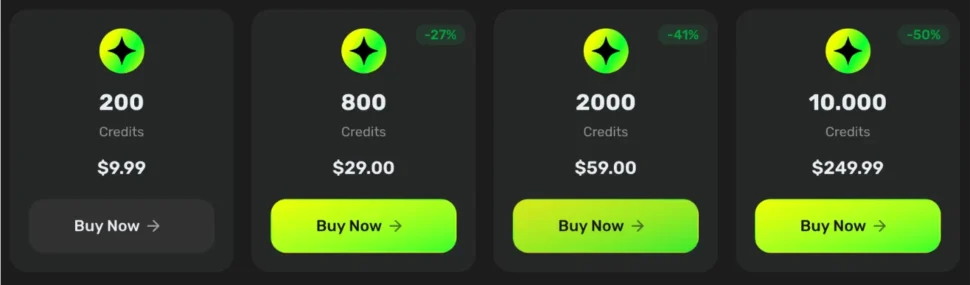
Honest take: the bulk-discount curve is real: the $29 pack drops to ~3.6¢ per credit, and the $249.99 pack halves the per-credit price of the entry Starter. If you plan to use the paid features more than twice, the $29 / 800-credit pack is the right and convenient entry; the $9.99 Starter is a test buy at almost double the per-credit cost. Like in some other cases not always is the more profitable choice. Credits are valid for 2 years from purchase, just think about that most credit-based competitors expire yours in 30–90 days.
The real gap here is credits-per-generation. You buy the pack before the site tells you how many credits one HD image or one Spicy Effects video actually costs, so the per-credit price above doesn’t translate into a per-result price for the reader.
Pros and Cons
✔️ Actually free to try, no signup, no email — the lowest-friction test in the category.
✔️ Accepts JPG, PNG and WebP (WebP support is uncommon here).
✔️ Ships a video mode (Spicy Effects), not just image — most single-purpose undress tools don’t ship any video pipeline.
✔️ Credits are valid for 2 years — unusually long; competitors typically expire in 30–90 days.
➖ Free tier uses a shared queue, so “seconds” is best-case, not typical.
➖ 10 MB upload cap and 2048 px output ceiling are middle-of-the-road, not a differentiator.
Verdict: Who It’s For
If you want to test what a browser-based undress tool actually produces without handing over an email, aiundress.cc is the shortest path – free tier, no account, drop and go. That’s the whole reason it exists on this list. On the paid side the credit-pack curve is decent (2.5¢/credit at the top pack, 2-year validity) and Spicy Effects gives you a photo-to-video path most competitors don’t bother with. The two reasons to hesitate before you buy: no visible consent / age language, and no credits-per-job number anywhere – so you commit money before you know what one image or one video actually costs you. Use the free tier for what it is, then if you upgrade, start on the $29 pack, not the $9.99 one.
Aiundress.cc FAQs
Is aiundress.cc actually free?
What file formats and size does aiundress.cc accept?
Does aiundress.cc keep or store the photos you upload?
Does aiundress.cc do videos?