Update November 2026:
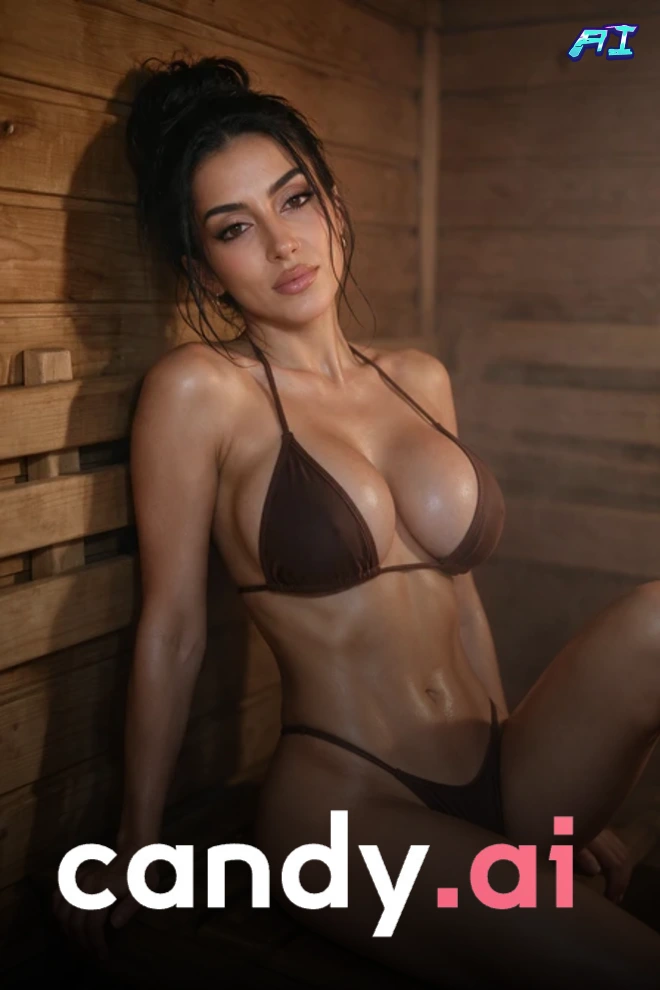
This page now covers Candy AI video in one place. Candy Studio now includes Candy Originals, a prompt-based video maker that runs on Seedance models.
What it is: Candy AI video is three tools in one app: image animation, preset clips in Studio, and prompt-built Candy Originals.
Best for: readers who want to direct short scenes with characters they already know, rather than only watch.
There are three ways to get a Candy AI video. You can animate an image you generated, build a clip in Studio from presets, or write a Candy Original from a prompt. Candy AI Shorts sit beside them as the part you only watch. Making 18+ videos needs a Premium plan plus tokens. As a Candy AI video generator it is character-first: you pick a woman you know, then decide what happens.
Candy AI Video in Facts: Three Ways to Make a Clip
- Image to video: animate an image you generated on Candy, in the realistic style, for female characters only.
- Candy Studio: cast a character, chain short preset clips, and let Candy stitch them into one scene.
- Candy Originals: describe a scene in a prompt and pick a Seedance model, with sound on by default.
Candy AI video generation sits on top of the rest of the app. You chat with a character, generate her images, then move those renders into motion. The one rule is simple: Shorts you watch, everything else you make. A video usually starts from a character you cast, and the choices stay inside that frame. Start with image animation if you just want motion, and move to Studio when you want to direct.
Candy AI Image to Video: Animating What You Generated
Candy AI image to video lives on the Generate Image page, inside the Generated Images area. Look for the toggle labelled “Show images you can turn into video”, which carries a New badge. Its hint reads “Highlight images you can turn into video!”. Switch it on and your gallery scroll becomes a filter: only the renders that can move stay lit.
I opened the info box titled “AI Video (Beta)”, and its text is blunt: “Currently available only for realistic girls. We’re working on adding more options for anime and guys very soon.” In practice you animate realistic female characters. They must be images you generated on Candy. If your characters are anime today, keep making stills on Candy and check the toggle again after the next update.
The cost per animation is still the open question. It shows on the token counter, so keep that counter in view while you try your first image. Clip length and resolution are not confirmed here, so treat the first render as a test. For NSFW image to video on a budget, one trial beats a guess.
Can you turn your own photo into a video?
The answer is no: Candy animates its own renders and characters only, with no upload for photos from your phone. If you searched for AI porn image to video with a photo in hand, that route is closed. The nearest thing is Studio’s references, where you cast a character or reuse one of your renders. Generate the image on Candy first, then flip the toggle and see what lights up.
Candy Studio: Make Your Own AI Porn Movie
Candy AI Shorts are what you watch, while Studio is what you direct yourself. It now has two doors: the preset video maker and Candy Originals. The first chains ready-made clips; the second turns a written prompt into a clip with a model of your choice. Both are for anyone who would rather make a Candy AI sex video than scroll a catalogue, and both run on tokens.
How Candy Studio works: presets, Lite and Pro
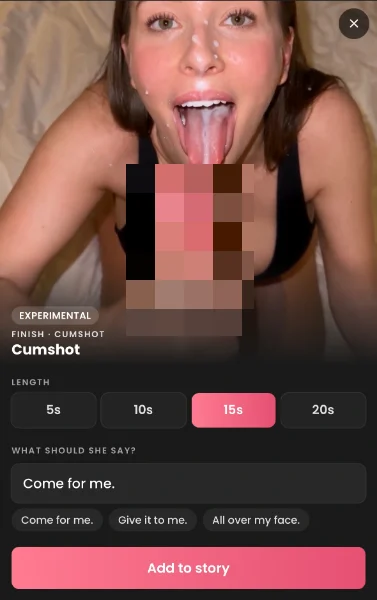
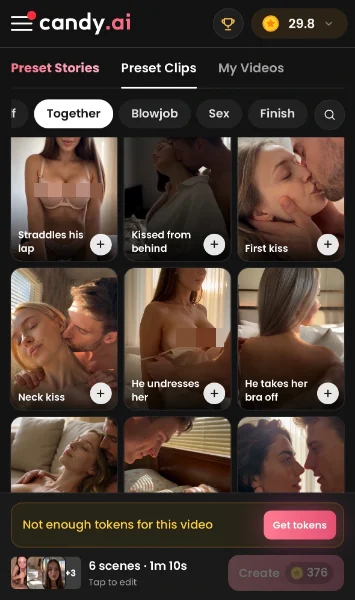
The preset side behaves like a small editing desk. You cast a character, pick the location, and chain short clips. The phases run in order: arrival, story, alone, tease, touching herself, together, then the explicit acts. Each clip lasts between 5 and 20 seconds, and the length is your call. Candy then stitches the clips into one continuous scene, so a Candy AI full video plays like a single take.
If you are short on time, preset stories come already assembled, so you only swap what you like. The Lite / Pro toggle sets how much control you get, and you can flip it whenever you want. Your videos are kept in both modes, so switching never wipes anything you made. Start in Lite to test the format, then move to Pro for control and spoken lines.
| Candy Studio | Lite | Pro |
|---|---|---|
| Presets | A few | All |
| Who directs | We do | You do |
| Spoken lines | No | Yes |
| Quality | Standard | Best |
| Speed | Fast | Slower |


Candy Originals: the prompt side of Studio
Open AI Studio from the sidebar and you land in a workspace titled Candy Studio, headed “Bring your fantasies to life”. The starters are Build it with Copilot, A hot scene, A short story and Surprise me. An Ask Copilot assistant helps build the scene.
The prompt box says to describe your scene, use @ to cast a character and # for camera moves. References take up to 15 items, each a Candy character or one of your renders, with no photo upload. Scene, Film setup, Camera, Color palette and Lighting complete the controls, with Image or Video as the mode.
Four Seedance models sit behind the prompt, and quality runs from 480p to 720p. Seedance 2.5 wears the TOP badge and makes multi-shot cinematic video with sound, running 4 to 30 seconds. Seedance 2.0, 2.0 Fast and 2.0 Mini run 4 to 15 seconds, with Fast for speed and Mini for budget drafts. Defaults are Seedance 2.5, one output, 720p, vertical 9:16, 5 seconds and sound on. Use 2.5 when you want length and sound, and Mini when you are only drafting an idea.
How many tokens does Candy Studio cost?
In my October test, a 15-second scene cost 76 tokens. A complete episode, around ninety seconds long, cost roughly 350 to 400 tokens. Studio prices creators like any other character, whereas a creator episode in Shorts costs more. On the Originals page, the Generate button shows 40 tokens at the default settings, which means one 5-second 720p clip with sound.
The 100 tokens that come with Premium each month cover two default Originals clips, or one 15-second scene. A full episode takes three and a half to four months of that allowance, so a regular habit means buying packs. This page has no figures for other lengths, resolutions or models, so watch the counter before you press Generate.
Who it’s for: Shorts suits you when you want to sit back and press play. Studio suits people who enjoy directing, because every clip, location and model is your decision. If you want Candy AI video porn that you shaped yourself, this is the door to open.
Creators and Digital Twins in Candy AI Video
Candy Creators are licensed AI digital twins of real adult performers. The performer licensed her likeness, but she did not shoot the scenes you make. Every profile carries a notice, and it is worth reading closely:
“This is an AI-generated digital twin. Images, chats, and other content here are AI-generated. Interactions here are fictional, consenting, and must comply with our Community Guidelines.”
Candy lists both Riley Reid and Mia Malkova among its Creators, and creators appear in Studio’s cast list. The October Studio test cast the Riley Reid twin. Any clips you make with either name are generated, not recordings. The full roster and the live side are in the Candy AI Live review. Cast a creator for a familiar face, but remember you are directing a licensed likeness, not the performer.
Candy AI Video Pricing: Premium and Tokens
Prices below are a snapshot at the time of writing (November 2026) and can change. Candy AI video needs a Premium plan, since 18+ video generation sits in its benefit list. The plan you pick only changes the monthly rate, because every plan includes the same 100 tokens a month.
| Plan | Per month | Billed | Label |
|---|---|---|---|
| 12 months | $3.99 | $47.88 a year | 70% off, best value |
| 3 months | $8.99 | $26.97 every 3 months | 35% off |
| 1 month | $13.99 | $13.99 a month | No discount |
Tokens are the second meter, and extra packs start at 100 tokens for 9.99 in your local currency. The largest pack holds 3,750 tokens for 299.99. Video is where tokens go fastest, and the numbers show why. At default settings, the Originals Generate button shows 40 tokens for a single clip: 5 seconds, 720p, sound on. The Studio cost section shows what a short scene and a full episode ran in the October test.
Can you get a Candy AI video free? Only for watching: each Shorts series opens with two free episodes. Making video runs on tokens, and Premium includes 100 a month. Budget in tokens rather than dollars, and test one short clip before you chain a full episode.
Candy AI Video vs Other AI Porn Video Generators
What sets Candy apart is the cast: you start from characters you may already know from chat. Sound comes with the Seedance models, and Studio lets you direct through presets, phases and locations. There is no photo upload, so every clip begins with a Candy render or character, which keeps the results consistent.
A different AI porn video generator may suit you better in two cases. If you want a plain NSFW AI video generator where you type a prompt, a lighter tool can feel faster. If you want anime or male animation today, Candy’s image to video Beta cannot help yet.
Browse the other AI porn video generators we reviewed. For serialized episodes you only watch, open the shorts roundup. Choose Candy for characters and direction, and look elsewhere for anime, male animation or prompt-only speed.
Pros and Cons
✔️ Three ways to make a clip: animate a render, chain presets in Studio, or write a Candy Original.
✔️ Studio gives you direction, with Lite and Pro modes, clips of 5 to 20 seconds and stitched scenes.
✔️ Originals offer four Seedance models with sound, and the top one reaches 30 seconds per clip.
✔️ Creators sit at the regular price in Studio, unlike in Shorts, where a creator episode costs more.
✔️ Your videos are kept in both Lite and Pro, so switching modes loses nothing.
➖ Image to video is still Beta and works only for realistic female characters for now.
➖ No anime or male animation yet, because Candy has announced both but neither is live.
➖ Originals top out at 720p, so expect phone-sized quality rather than big-screen sharpness.
➖ Longer clips burn tokens, so watch the counter before you chain a full episode.
Verdict
Use image to video if you already generate on Candy. It suits a favourite render you want to move, though it covers realistic girls only. Use Studio if you like directing scenes from short clips. Pick Originals if you would rather write a prompt and choose a Seedance model. Keep one eye on the token counter, because video is where it drops fastest. Test a single 5-second clip before you chain anything longer.
Candy AI Video FAQ (2026)
Is Candy AI video free?
How do you turn an image into a video on Candy AI?
Can you upload your own photo to make a Candy AI video?
What is Candy Studio and how is it different from Candy AI Shorts?
How many tokens does a Candy AI video cost?
Can you make Candy AI videos with Riley Reid or Mia Malkova?
Are there Candy AI video leaks or downloads?